Open GApps: Install and manage Google apps for custom Android ROMs
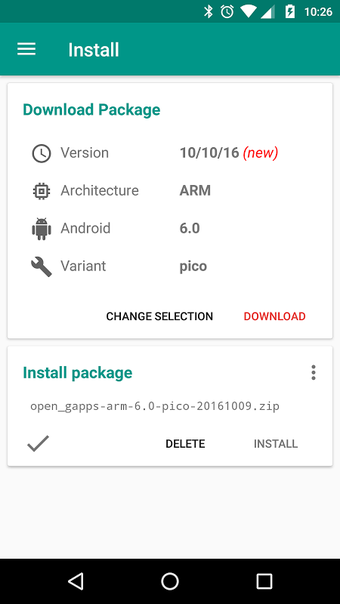
Detects CPU architecture and Android version, downloads the matching Google Apps package, and can instruct a recovery to flash it automatically. Fonville IT provides the official Android interface for the Open GApps Project, a utility aimed at restoring Google services on custom ROMs. The app offers package variants from Pico to Super, built-in MD5 checksum verification, and nightly builds, making it suited for advanced users and developers who install or maintain custom firmware.
How the app selects and delivers the correct GApps bundle
Open GApps reads the device CPU architecture (ARM, ARM64, x86, x86_64) and the current Android version, then presents compatible package variants from minimal to full. Downloads include an MD5 checksum check to verify integrity, and VersionLogs show recent changes. The downloader targets the exact build that matches the detected device, reducing manual selection steps for installers who already know which package size they need.
How it interacts with the device and what system access it needs
The app can download packages without elevated privileges, but integration with custom recoveries for automated flashing requires root access. It supports devices running modern desktop-class Android versions and writes the chosen package into the recovery workflow when root and a compatible recovery are present. MD5 verification prevents corrupted installs by checking file integrity before any flashing step proceeds.
Safety, stability and the role of nightly builds
The project distributes nightly builds to keep Google apps current, and the application is open-source, which provides transparency about packaging. Users have reported that manual flashing via a recovery tends to be more stable than the app's automated method, so installers who need conservative stability may prefer manual steps. The app displays advertisements to support hosting and development costs.
Who can operate it and the learning curve involved
The tool targets experienced Android users, ROM maintainers, and developers; automatic detection reduces basic errors, yet successful flashing still assumes familiarity with recoveries, root concepts, and permission implications after an install. Casual users unfamiliar with custom recoveries or root should avoid automated flashing and follow documented manual procedures instead.
Conclusion and practical recommendation for installers
Open GApps fits advanced ROM installers and developers who want fine-grained control over which Google apps are present and accept developer-driven update cadence. It provides integrity checks and transparent packaging, but automated flashing requires root and a willingness to handle recovery-level operations. For anyone who installs custom firmware regularly and values up-to-date bundles, the app is a focused, community-backed tool. Recommended.